
Table of Contents

Operator's Handbook
I've chosen to set the Reaper up to support our group's playstyle. It is intended to be flown, not just left to orbit. You can of course use it however you like. The way we use it maybe different than you. We have dedicated “pilots” in our teams but not every mission needs fast jets or attack helos. So having a UAV ready to provide ISR or light CAS gives our mission maker's options.
The drone uses the vanilla UAV control system. No ACE interactions etc. You need a UAV terminal to operate it. ideally the same faction etc. But if you can get close enough you can always hack it.
The intent was to make an platform that takes some degree of skill to use effectively. it is meant to be flown from the Pilot's seat. Weapons can be used from both the pilot and gunner positions but we mostly employ the weapons in the Pilot's seat. it gives use some more flexibility and accuracy… and is less arcade like.
You will need to learn how to use the weapons effectively, what the limits are and what weapon is best in what scenerio.
Flight Characteristics
I have obviously not flown the M-Q9 Reaper. But it reportedly flies a lot like a more powerful Cessna 172/182 (I have over 300 hours in them), roll rate, landing, approach and cruise speeds etc.
As much as I try to get the flight model as accurate as possible the AI and engine limits always force us to make compromises. And trust me, with anything that is AI controlled in Arma3, it is always a compromise.
| In Game | Real World | ||||
|---|---|---|---|---|---|
| KtAS | KPH | KtAS | KPH | ||
| Max Speed | 260 | 482 | 260 | 482 | |
| V1 Speed | 80 | 148 | ? | ? | |
| Vr Speed | 92 | 170 | ? | ? | |
| V2 Speed | 103 | 190 | ? | ? | |
| VNe | 270 | 500 | ? | ? | |
| Stall Speed | 75 | 140 | ? | ? | |
| Feet | Meters | Feet | Meters | ||
| Service ceiling | 50,000 | 15,420 | 50,000 | 15,420 | |
| Opertional Alt | 25,000 | 7,500 | 25,000 | 7,500 | |
| Hours | Hours | ||||
| Endurance | ~5 | ~27 | |||
Pilot's HUD Layout
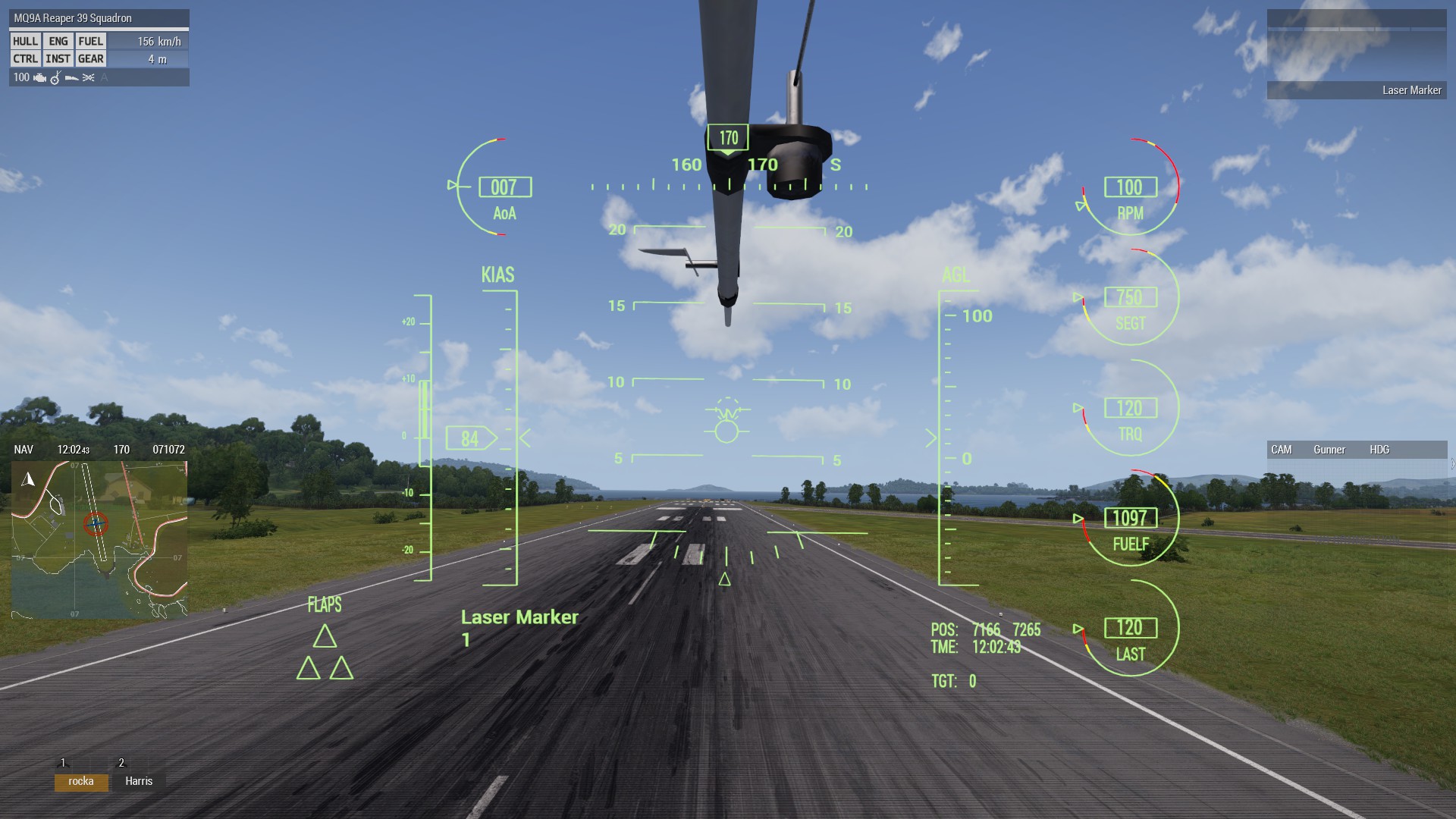
Flight instruments are in FEET and KNOTS!
The HUD is a mix of “Class MFD” and animated model. It is based off the actual MQ-9 interface. But obviously more limited due to engine limitations and lack of scripting.
Top Row: From the Top Left:
- Angle of Attack (Degrees)
- Heading Ribbon
- RPM (%)
Second Row: Left to right:
- Vertical Speed indicator (Ft/Min - not exactly accurate yet)
- Indicated Airspeed (Knots)
- Artificial Horizon
- Radar Altimeter (Above Ground Level)
- SEGT - Exhaust Gas Temperature - (Honestly just cosmetic. Was scripted but was not MP friendly)
- TRQ - Engine Torque - Again, just visual, tied to RPM
- FUELF - Fuel Fuselage - Mass in lbs.
Third Row: Left to right:
- FLAPS - Text indicator
- Landing Gear indicator
- Selected Weapon and Quantity available
- POS - ingame coordinates 8 figure grid
- TME - Local game time.
- TGT - Range to Target
- LAST - I can't remember what this was supposed to be. The pic i used for ref was very low res. 'LAST' is basically just the last guage.
Observer's HUD Layout
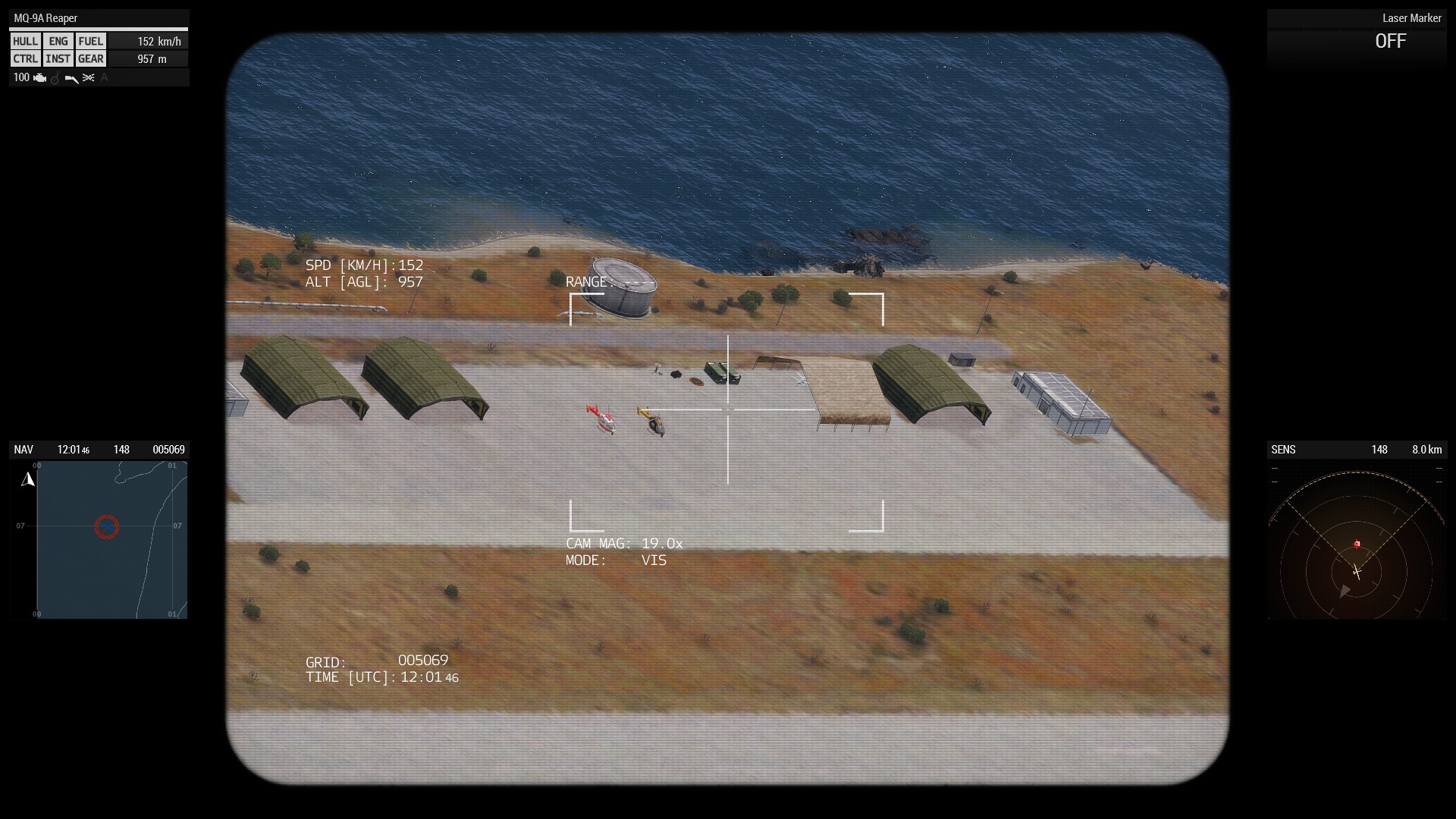
It is the default BIS UAV RSC layout. I was writing a custom on. I admit I got frustrated lost my temper and abandoned that idea. I'm not a fan of coding. So if someone would like to make an MQ-9/AN/DAS-1 MTS-B Multi-Spectral Targeting System specifi layout. I would appreciate it.
If not, I'm old grumpy and not good with code. So since my remaining life is too short to spend weeks frustrated so we'll have to stick with the BIS layout unless some kind soul donates one.
NOT a Radar
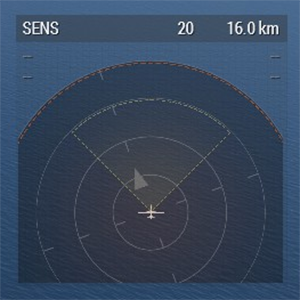 The MQ-9 does not have a radar. Our addon also does not have a radar. This is the default Arma 3 Sensor display. In this case its primarily for targetting and threat display. Secondarily it also shows any available Data-Linked targets.
This means than anything detected by units with the datalink capability will show up on the sensor display. Including laser targets and other threats. Meaning you can use another unit to designate a target e.g. a soldier on the ground and still engage without having to lase anything yourself.
You can read up on the default game behaviour either on:
- BI Community Wiki - Sensor page.
- BI OPREP - Sensor Update
So, yeah. Not a radar. People keep saying it is. I keep saying it is not. it is the way the game engine displays things. And its not really any different than most NATO threat displays.
Weapons
Personally I would prefer to limit all weapons to only types cleared for use on that specific airframe. Not everyone agreed so I've opened up the options to include other weapons in the appropriate weight class that may fit on the pylons. I.E. I'm not going to add 2000lb bombs on a pylon limted at 500lbs and so on.
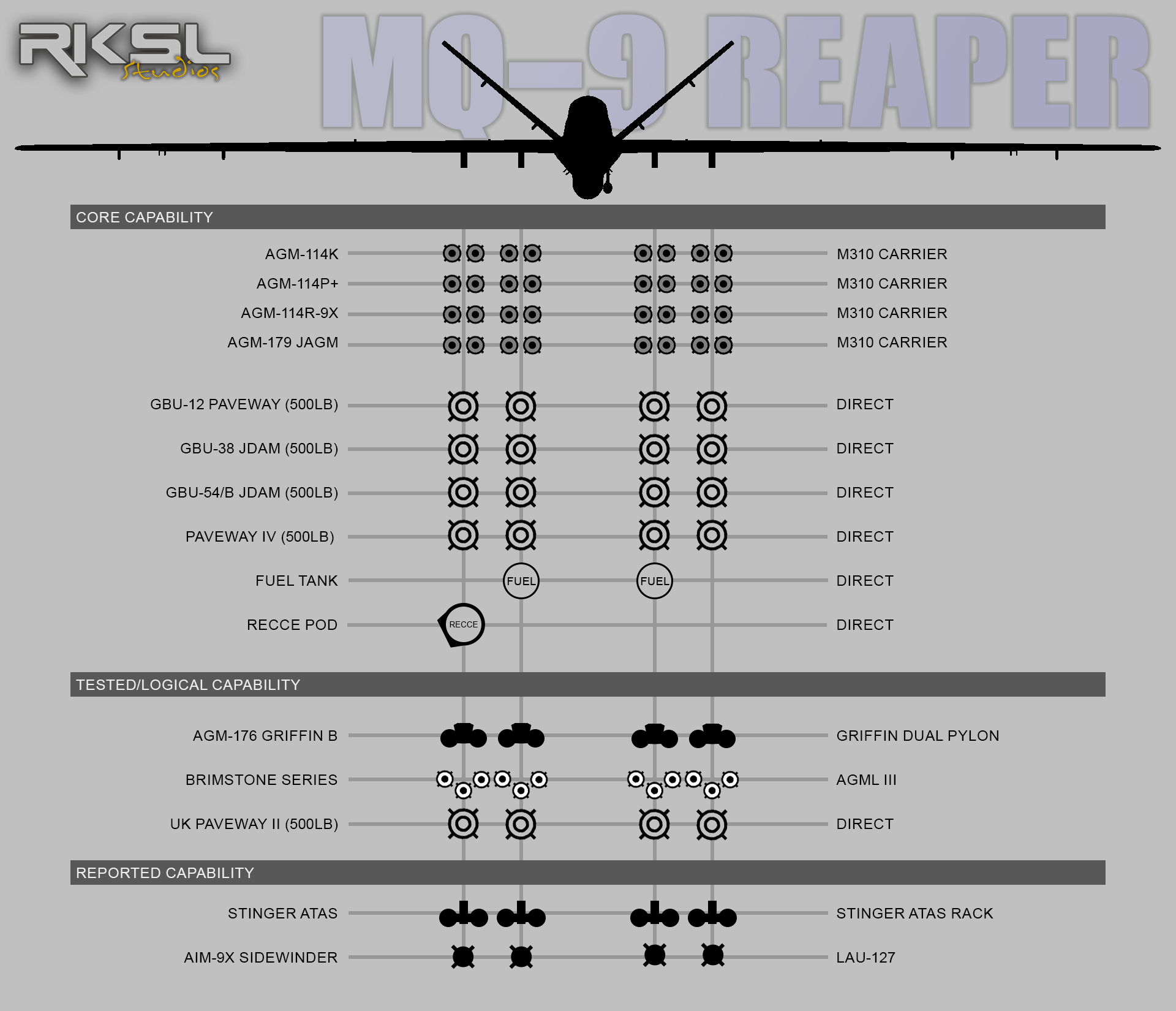
Currently Supported Weapons
The MQ-9 Reaper only has 5 pylons. The 5th, the centerline is not available on this mod. Its exclusively used for Sensor and Radar pods so not really necessary or practical for this game.
The four remaining pylons are limited to:
- Up to 1,500 lb (680 kg) on the two inboard weapons stations
- Up to 750 lb (340 kg) on the two outboard stations
Cleared for use
Every weapon, pod and sensor that hangs off an aircraft has to be tested, certified and 'cleared' for operational use. Some weapons do not go on some aircraft despite being in the same class or type. There maybe many reasons for that. over and above just the weight. Drag, volume, clearance between the weapon and the aircraft etc.
Officially, the MQ-9 Reaper is only cleared for a limited set of weapons. For Arma 3 use we are limited by the contents of the CVWP. Currently we have:
- AGM-114 Hellfire Series
- AGM-114K - Laser Guided missile
AGM-114L - Longbow Radar Guided missile- (This has been removed as the MQ9 does not have Radar.)- AGM-114P+ - Specifically designed for UAV use.
- AGM-114R-9X - Flying Ginsu knife missile.
- AGM-179 JAGM - Replacing Hellfires for longer range strikes
- GBU-12 Paveway (500lb)
- GBU-38 JDAM (500lb) - Uses Data linked targets ONLY
- GBU-54/B JDAM (500lb) - Uses Data linked targets ONLY
- Paveway IV (500lb) - Exclusively used by the UK Royal Air Force
- Fuel Tank - Currently cosmetic only.
- Recce Pod - Currently cosmetic only. Was used as a prop for High-value asset recovery (HVAR) missions.
Not Cleared but Available
- AGM-176 Griffin B - Light Weight missile. Much smaller warhead, low collateral not typically used on large Drones.
- Brimstone Series - Not strictly cleared on MQ9A Reaper. But it is on the UK's Protector RG.1 a varient of the MQ-9B SkyGuardian
- UK Paveway II (500lb) - Paveway 2 kit on a UK MK4 MC warhead.
Weapon selection in 3DEN Editor
The addon is setup to use the game's native “dynamic pylon system”. You can select the predfined weapons in the mission editor by double clicking the drone or right clicking to get the object properties up. From there you should be able to expand the Pylon Settings rollout.

You can then select any of the weapons options on the dropdown.
Weapon Selection
Choose your weapons carefully. The weapon all have limitations of some sort. That is the result of many many years of MP gaming sessions, Coop, Milsim, PVE and PVP. Some are intended to make like a bit more difficult for the pilot, but ensure MP gameplay. Others are simplified and meant for PVE. But the option is there to allow mission makers to decide what kind of playground they want to make.
For example:
- JDAMS require DATALINKED targets. They dont have Laser or IR targetting. Just datalinks. Meaning someone needs to mark and share the info.
- Some limit the warhead meaning you need more than one missile etc.
- Some are meant to be used only on softskins etc.
Weapon Delivery
The MQ-9 Reaper is designed to be flown. Use the turret to observer and mark targets. Datalinks are enabled by default. But to be truely effective you should be flying from the pilot's seat to ensure your LGBs hit the mark. LGB and JDAMs only guide to a limited degree. Use the CCIP HUD marker, as long as you can see that little + at the moment of release (And you are high enough) the bomb will guide correctly.
Thats it, have fun.
Rock
Dec 2025
Page Tools


